
Print sizes you can download
| Download option | Paper | Pixels | Notes |
|---|---|---|---|
| Print 2×6 | 2×6 in | 600 × 1800 px | Portrait PNG or JPEG · 300 ppi. One complete layout fitted on white, with no crop line. |
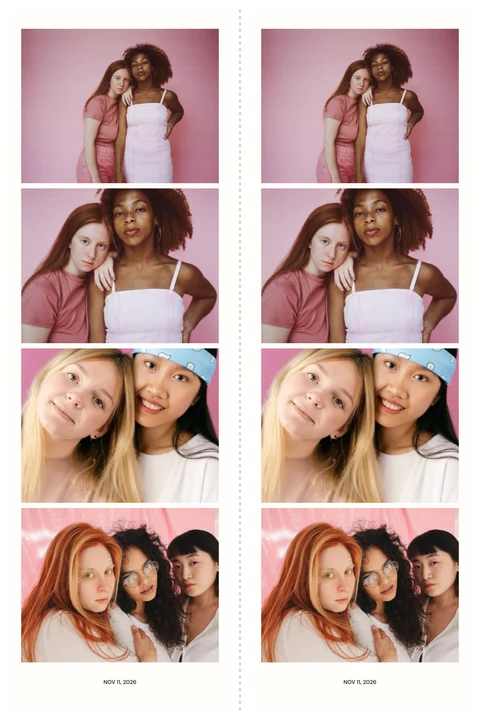
| Print 4×6 · 2 strips | 4×6 in | 1200 × 1800 px | Portrait PNG or JPEG · 300 ppi. Two identical strips side by side, with a dashed center cut line. |
| Original layout (Four Cut) | Choose fit when printing | 1200 × 3800 px | Slightly taller than an exact 2×6 ratio. Use fit for this original file, or choose a print size for exact 2×6 / 4×6 output. |
| Story · 9:16 | For screen sharing | 1080 × 1920 px | The complete layout on a background. This is not a paper-size export. |
Both print sizes include 300 ppi density metadata, often called 300 dpi in print settings. Four Cut is scaled proportionally to 552 × 1748 px inside each 600 × 1800 px strip area, leaving 24 px of white on each side and 26 px above and below. Your existing crops, caption, date and stickers stay together; the print export adds no extra photo crop.
The 4×6 file adds a 2 px dashed gray line at the center, in the white space between the strips. Choose Print saved strips to use an existing file twice, or put two different finished strips side by side. A single 2×6 file has no center guide.
Starting with one adult selfie? Download a 300 ppi AI print sample.
How to print
- Download Print 2×6 for one strip, or Print 4×6 · 2 strips for a sheet you can cut into two.
- Choose matching 2×6 or 4×6 inch paper in your printer or print service, in portrait orientation. Use Save JPEG if your photo lab requests it. Print at actual size with scaling and borderless enlargement disabled. Check the preview for extra cropping.
- Cut the 4×6 sheet down the dashed center guide to make two 2×6 strips. Make one test print before printing copies for guests.
For an exact 2×6 strip or two strips on 4×6 paper, download a print size. If you use the original 1200 × 3800 px Four Cut file instead, choose fit so its slightly taller layout is kept in view.
How to make it
- Open the booth.
- Upload four JPEG, PNG, WebP or HEIC photos, or take four shots.
- Choose the Four Cut layout and check each photo’s crop.
- Pick a filter and frame, then add the date, a caption or stickers.
- Click Preview 2×6 print to open the preview at 600 × 1800 px and 300 ppi.
- Choose Print 2×6 or Print 4×6 · 2 strips.
- Save the PNG or JPEG and print at actual size. Cut a 4×6 sheet in half along the center guide.
Tips for a wedding or party table
Open the booth on one phone or tablet, take four shots and let guests choose a frame. Photos stay in that browser, and the free PNG has no watermark. Download the print size, then send the file to your printer or print service yourself.
PhotoBoothFilter does not connect to a printer or print automatically. For automatic on-site wedding prints, use a dedicated iPad printing app. If the venue provides finished digital strips, put them on a 4×6 sheet with Print saved strips before ordering prints.
Try a Korean-style 4-cut photo, browse the six photo booth filters, or use the photo strip maker for other photo counts and layouts.
Need the individual pictures from a finished print file? Split a photo strip into PNGs.
Frequently asked questions
What size is a photo booth strip?
A common photo booth strip size is 2×6 inches. Choose Print 2×6 for a 600 × 1800 px PNG or JPEG at 300 ppi, with your complete layout fitted on white. The original Four Cut file is 1200 × 3800 px, slightly taller than an exact 2×6 ratio; print that original using fit.
Can I print two strips on 4x6 paper?
Yes. Open Print saved strips and add one file for two copies, or two files to put a different strip on each side. Classic Booth can also repeat a strip you just made. The 1200 × 1800 px file has a center guide for cutting a 4×6 print in half.
Can I print a photo strip I already have?
Yes. Choose Print saved strips and select up to two finished JPEG, PNG, WebP or HEIC files. Each complete file fits its own half of the sheet in its original proportions. For one 2×6 inch strip, add one file and select 2×6.
Is there a watermark?
No. Both print sizes and the original PNG are free, with no watermark. You do not need to sign up or buy credits.
Can I use photos from my phone?
Yes. Upload JPEG, PNG, WebP, HEIC or HEIF photos, up to 20 MB and 24 megapixels each. HEIC and HEIF are prepared locally on your device; if a file cannot be read, export it as JPEG and try again.
Do my photos get uploaded?
The free print tools process images in your browser. The saved-strip print sheet stays open while you are on this page, so download it before leaving. Classic Booth can also save its latest draft in this browser for seven days.
Can I add the date or our names?
Yes. The date is on by default, and you can edit or hide it. Add your names in a text caption or add stickers before downloading; the print export keeps these decorations with the complete layout.